
Download Rustdesk Client
Steps for Downloading the Rustdesk Client
Note* - This will allow Paragon Access to your Desktop - DO NOT DO THIS IF YOU DO NOT WANT TO ALLOW REMOTE ACCESS
Download Rustdesk
Open a web browser and go to https://rustdesk.com
Select Download, it will take you to https://github.com/rustdesk/rustdesk/releases/
At the time of writing, the current version is 1.3.7 (https://github.com/rustdesk/rustdesk/releases/tag/1.3.7)
There is a warning on this page that you need to consider. If you are not doing this on behalf of a known person, STOP NOW.

If you are doing this because you are sure you want to allow remote access, then proceed to download the correct version for your Operating System.
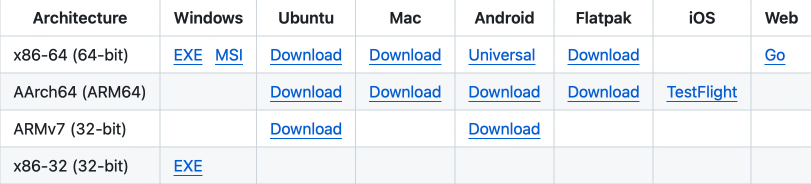
- For Windows Versions 7,8,10,11 select "x86-64 (64-bit)" and download "exe" or "msi"
https://github.com/rustdesk/rustdesk/releases/download/1.3.7/rustdesk-1.3.7-x86_64.exe
https://github.com/rustdesk/rustdesk/releases/download/1.3.7/rustdesk-1.3.7-x86_64.msi
- For earlier versions of Windows select "x86-32 (32-bit)" and download "exe"
https://github.com/rustdesk/rustdesk/releases/download/1.3.7/rustdesk-1.3.7-x86-sciter.exe
- For M-Series Apple Mac select "AArch64 (ARM64)" and "Download"
https://github.com/rustdesk/rustdesk/releases/download/1.3.7/rustdesk-1.3.7-aarch64.dmg
- For Intel-Series Apple Mac select "x86-64 (64-bit)" and "Download"
https://github.com/rustdesk/rustdesk/releases/download/1.3.7/rustdesk-1.3.7-x86_64.dmg
If you are unsure, ask for assistance.